


Making HubSpot easy... what's this all about, anyway?
Discover practical tips and tricks to help you use HubSpot more effectively and efficiently. Reduce chaos and gain clarity in your day-to-day work.
How I, as an Account Executive, revolutionized my day-to-day sales work at HubSpot with Breeze Assistant—and why I can no longer imagine working without these three features.
How I, as an Account Executive, revolutionized my day-to-day sales work at HubSpot with Breeze Assistant, and why I can no longer imagine working without these three features.
Why Breeze Assistant Makes My Sales Life Easier
I’ve been working at HubSpot for a few years now. And to be honest: the last few months have felt different. Not calmer, not “easier,” but much clearer. And for me, that has a lot to do with Breeze Assistant.
But it’s also important to me to note: It wasn’t like that from day one. When Breeze launched, the product was, in my view, still quite limited. Many things I would have wanted in my day-to-day sales work simply weren’t possible yet—or were only available in a very rudimentary form. There were a few nice, practical use cases, but much of it felt more like an exciting glimpse into the future than a tool that would give me an immediate, tangible advantage. That’s why I used Breeze only sporadically at first and then set it aside again, because it didn’t really make me any faster in my day-to-day work.
At the same time, my day as an AE looks pretty much the same: I have a fairly large account portfolio in the DACH region under my name—roughly 800 to 900 accounts that are “on my plate” in one way or another. Of course, not all of them are actively in the funnel, but they generate signals: website visits, form submissions, email interactions, new leads, and old opportunities that resurface. On top of that, there are the classic tasks: driving ongoing deals forward, identifying new opportunities, internal coordination, and forecast meetings.
With this many accounts, it’s clear: I can’t dive deep into everything. I have to make very deliberate decisions about where to invest my time and where not to. “Just clicking through everything” doesn’t work with 800–900 accounts. If I don’t work systematically here, I’ll quickly lose track of things.
That’s exactly why Breeze only really felt relevant to me once the use cases became more concrete and suitable for everyday use. It’s no longer just “AI in CRM,” but rather very practical support for sorting through this flood of signals and giving me clarity on where it’s worth digging deeper.
For me, Breeze’s greatest value isn’t in “AI for AI’s sake,” but in the fact that it helps me move more quickly from context to clarity—and from clarity to action—in my day-to-day work. I still decide for myself what to do and how to do it. But I have to gather, sort, and structure significantly less information, which makes a real difference given the number of accounts and touchpoints.
In this post, I’ll show you three specific use cases from my everyday life that are really helping me get ahead! Nothing theoretical—just situations that happen every week, either exactly like this or in a similar way.
Use Case 1: Signals & Priorities
A typical situation: Monday morning. I open HubSpot and see a long list of accounts with new activity. Website visits, opened emails, new contacts in the buying center, old deals that are showing movement again.
On paper, all of this is valuable. In practice, without structure, it’s just noise at first. This is exactly where Breeze Assistant helps me—whenever many signals come in at once and I have to decide where to best invest my limited time.
Instead of just describing what happened, Breeze mainly helps me with questions like:
Which account really deserves attention this week?
Where is there realistic potential for upgrades or cross-selling?
Who in the account seems more technically interested, who is more of a business decision-maker, and where is a sponsor still needed?
What’s the most sensible next step right now: an email, a call, a demo, providing added value through content, or is it wiser to wait and see for now?
Breeze pulls in everything available in the CRM plus online research! Past activities, old deals, meeting notes, website behavior, product interests, roles in the buying center, and internal comments. For me, the added value isn’t just, “Here’s a summary of the information.” The added value is, “Here are the three accounts you really should look at today, including a clear hypothesis and the reasoning behind it.”
Use Case 2: Context!
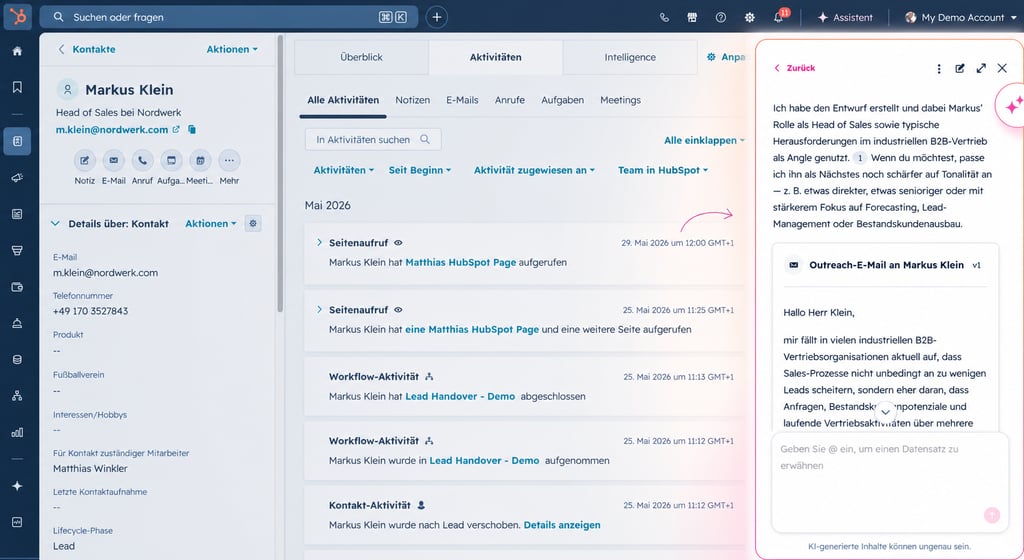
For me, the second major benefit of Breeze Assistant lies in communication! Especially with accounts where I have almost no context at the beginning—exactly the cases where there’s little history in the CRM, yet I still want to make a meaningful, non-generic initial outreach.
Here’s how that looks in my day-to-day work: For new or rarely managed accounts, I use the same core prompt in Breeze almost every day:
“I need an outreach email in [LANGUAGE] for [CONTACT] with a clear perspective on industry trends or typical challenges relevant to [COMPANY], and a brief value proposition explaining exactly how HubSpot can help with that. At the end, the email should ask whether this topic is currently on their agenda and whether it would make sense to briefly discuss it.”
Breeze then pulls together whatever information it can find about the account, industry, and contact (website, existing CRM data, and form submissions, if applicable) and uses that to create a first draft. It’s not perfect yet—especially when there’s very little data, you quickly notice its limitations—but within a few seconds, I have:
a concrete hook based on a typical problem in the respective industry,
a clear position on the matter (instead of clichés like “we help companies be more successful”),
a brief, understandable explanation of exactly how HubSpot helps with this specific issue,
and a closing that doesn’t immediately try to “sell a meeting,” but first checks whether the topic is even on the client’s radar.
This helps me especially with accounts assigned to me where there are hardly any meeting notes or deals to start with. Without such a structured opening, I’d honestly often not even get started with these “low-context accounts” because the hurdle of starting completely from scratch is simply too high in day-to-day business.
Things get interesting in the second step: I don’t just have Breeze write standard texts; I feed it the principles I want to use when selling. Here’s an example: From the book *“UnReceptive: A Better Way to Sell, Lead, and Influence,”* I very consciously adopted the concept of “other-centered selling.”
Specifically, this means for me:
The focus of the email is clearly on the recipient’s perspective, not on me or HubSpot.
I avoid making promises and instead formulate hypotheses (“Many companies in [industry] are currently seeing XY…”).
I try to demonstrate relevance and understanding first, before discussing features or products.
The call to action is more of an invitation to consider whether the topic makes sense right now, rather than a direct “sales pitch.”
I don’t just jot these principles down in a notebook; I also consciously save them in Breeze, either as recurring prompt extensions (“Please draft the email according to the ‘other-centered’ principle, focus on the contact’s perspective, no exaggerated promises, clear hypotheses instead of blanket statements”) or, if the feature is available, in the memory function.
As a result, over time, the outreach drafts start to feel more like “me,” even though, technically speaking, they come from Breeze. I can really see how my own learnings—for example, from *UnReceptive*—are reflected in the responses:
less “We at HubSpot…,”
more “Many companies in your situation are currently facing…,”
specific observations on industry trends,
and a calm, inviting question at the end, such as:
“Is this topic relevant to you right now, or something you’d rather address later? If it’s on your agenda, I’d love to have a quick conversation to understand how you’re handling it today.”
My process is usually the same: I have Breeze generate an initial draft using this outreach prompt, check whether the point of view aligns with the industry and the account’s actual situation, add a personalized observation if needed (e.g., something from the website or a job posting), tweak the tone slightly—and within a few minutes, I have an email that doesn’t sound like a standard AI-generated message, but rather like a well-thought-out initial outreach.”
So, for me, Breeze becomes a combination of:
Accelerator (I don’t have to start from scratch),
a context translator (industry + typical problems → clear message),
and a “repository” for my own sales principles (such as “other-centered selling” from *UnReceptive*), which I incorporate bit by bit using prompts and memory.
The result: My initial outreach messages are completed faster, are more relevant to the subject matter, and are at the same time more closely aligned with the other person’s perspective—even when I have very little concrete information in the CRM at the start.
Use Case 3: Clarity
For me, the third use case offers the greatest leverage. Breeze Assistant helps me translate complexity into clarity—especially when a lot of information from different sources comes together and I need a clear overview in a short amount of time.
Typical scenarios for me include:
complex deals involving multiple stakeholders,
pipeline reviews and forecast discussions,
internal business reviews,
comparisons within the team,
account summaries before important client meetings.
Of course, Breeze can generate standard summaries. But it really shines when I have it generate structured HTML documents, especially for Dealboard analyses.
That might sound technical at first, but it’s actually very practical in everyday use! Instead of just seeing an unsorted list of deals, I get a visually structured document that shows, among other things, the following for each opportunity:
a concise opportunity snapshot (deal size, phase, time spent in the current stage, key contacts),
Opportunities: Where is there momentum, where is a clear business case visible, where do we already have champions in the account,
Risks and roadblocks: lack of a financial decision-maker, unclear timeline, dependencies on IT resources, strong competition,
Next logical steps: Who should be approached, when, and how, and with what specific focus,
Possible coaching questions: Where would it be worthwhile to talk with my manager or colleagues to develop a better plan,
Recommended Priorities: Which three to five deals really deserve active focus this week?
A theoretical example that closely resembles a real weekly meeting at our company: Before a weekly deal board meeting, I want not only to see all open opportunities in the CRM, but also to understand:
Where is there real momentum?
Which deals look good in the forecast but have hidden risks?
Which opportunities still lack clear, documented next steps?
I used to go through them deal by deal. I’d read emails, look up notes, ask around internally, and then manually put together a sort of cheat sheet. That was time-consuming and still not always complete.
Today, I have Breeze generate an HTML document based on existing CRM data, emails, and notes that provides structured answers to exactly these questions. On a single page, I get:
a clear list of my most important opportunities,
a concise status summary for each deal, including phase, stakeholders, risks, and plausible next steps,
indications of which deals haven’t shown any real progress toward a decision for quite some time,
suggestions on where coaching or additional internal discussion would be helpful.
I’ll take this document with me to the meeting. Instead of spending time during the meeting searching for and explaining data, I can jump right into the substantive discussion:
“This deal looks good in the forecast, but we still don’t have clear access to the business decision-maker.”
or
“There’s strong interest in the product here, but the IT department has valid questions, and I need support for a detailed technical discussion.”
The same approach is also valuable for other formats:
internal QBRs,
management updates,
structured account summaries ahead of meetings with VPs or C-level executives.
Whenever information is scattered and hard to grasp, Breeze helps me organize it in a way that makes decision-making easier—for me, for my team, and for management.
Bottom line: Clarity first, action second
Looking back on the last few months with Breeze Assistant, my day-to-day work as an account executive has changed significantly. Not because I’m working less or “delegating everything,” but because I’m working differently.
I spend less time
manually sorting through signals,
clicking through information across multiple tabs,
or sitting in front of a blank email editor.
Instead, I get to the bottom of things faster:
Which accounts are truly relevant today and this week?
Which message is right for which person at which time?
Where are the opportunities and risks in my pipeline—and what does that mean specifically for my next steps?
Breeze doesn’t take responsibility away from me. But it helps me turn a lot of information into meaningful action more quickly. My conversations improve because I’m better prepared. My communication becomes more personal because I can focus more on content. And my decisions are more well-founded because I see the bigger picture more clearly.
Ultimately, Breeze isn’t just an “AI toy” to me—it’s a practical tool for my day-to-day sales work. It ensures that I can spend more time on the things that really matter to my customers and to me: meaningful conversations, clear assessments, sensible next steps—and deals that are transparent and sustainable for both sides.
Discover practical tips and tricks to help you use HubSpot more effectively and efficiently. Reduce chaos and gain clarity in your day-to-day work.
Artificial intelligence is currently changing the way people search for answers—and SEO strategies from the past 10 years suddenly aren't working as...